Shortened links are a powerful convenience, but they can be easily abused to hide dangerous destinations. Before you click, this guide will show you how to check short URL safety and instantly verify any compressed link you encounter.
Quick Answer: How to Instantly Check a Shortened URL’s Safety
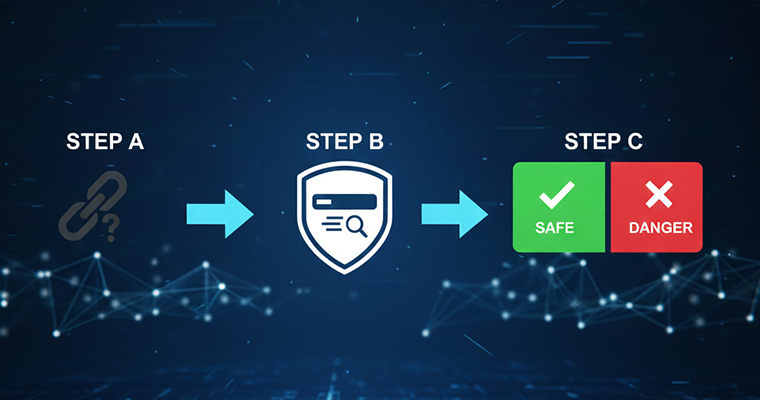
The fastest way to check a short URL is by using a dedicated URL expansion tool or a multi-engine security scanner like VirusTotal. These services reveal the final destination URL and scan it against dozens of threat databases without requiring you to click the original link. This simple step protects you instantly from modern threats like hyper-personalized phishing scams and drive-by malware downloads.
Unmasking the Threat: The Critical Risks of Short Links
Shortened links are unavoidable in the modern web, they clean up social media posts, make print materials concise, and track clicks effectively. But under the hood, they hide the final destination, making them the perfect camouflage for cybercriminals. In today’s landscape, with AI generating more sophisticated scams than ever before, checking every short link isn’t just a suggestion; it’s mandatory.
Risk 1: Phishing and Credential Theft
This is the most common attack vector. Scammers use short links to redirect you to an imitation login page for a service you already use, such as Microsoft 365, Google Workspace, or your bank. These pages are now hyper-personalized using AI, making them almost impossible to distinguish from the real deal. Clicking a short link can take you directly to this trap, where entering your username and password means instant credential theft.
Risk 2: Malware and Drive-by Downloads
Malware is now commonly delivered via these concealed links. A short URL can lead directly to a website that silently triggers a drive-by download, installing Trojans, Spyware, or even Fileless Malware on your device without any explicit confirmation. Ransomware attacks, which encrypt your data and demand payment, are frequently initiated this way, turning a casual click into a full-blown crisis.
Risk 3: Undermining Trust and Reputation
Short links aren’t just a threat to your personal security; they damage organizational trust. If a short link shared by a friend, colleague, or even a brand you trust leads you to a malicious site, it immediately breaks confidence in that source. For businesses, a single compromised short link can cause significant Online Reputation Management (ORM) damage that takes months or years to repair.
Step-by-Step: 3 Manual Methods to Check Short URL Without Clicking
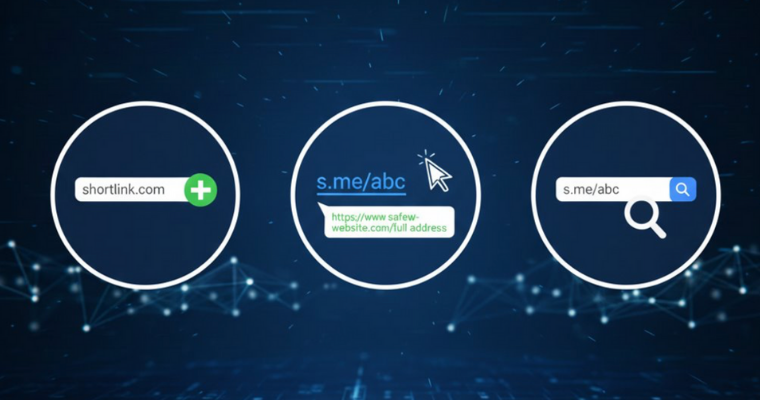
The best defense is not clicking the link at all. Instead, use these three simple, manual methods to reveal the true destination.
Method 1: The ‘Plus Sign’ Inspection Trick (For Certain Services)
- Step 1: Look closely at the short URL. If it uses a common shortening service (such as certain high-traffic or internal corporate shorteners), you can often append a plus sign (+) or sometimes a question mark (?) to the end of the URL.
- Step 2: Paste this modified URL into your browser’s address bar and hit Enter. Instead of redirecting you, the shortener’s service page should load, displaying metadata, the number of clicks, and, most importantly, the final, long destination URL.
Method 2: Browser Status Bar Hover Check (The Quickest Scan)
This method is fast but only works reliably on desktop browsers. Do not rely on this alone, as sophisticated attacks can still change the destination upon clicking.
Simply place your mouse cursor directly over the short link without clicking. Most modern browsers will display the link’s true destination in the lower-left corner of the window (the status bar). If the revealed URL still looks suspiciously complex or points to a domain completely different from what you expected, do not click.
Method 3: Reverse Lookup via Google Search
If the short link is generic, you can try copying the entire short URL and pasting it directly into the Google search bar.
If the URL has been heavily shared or is legitimate, Google’s search results often reveal the original content, destination page title, or context, allowing you to verify the safety and source before visiting. If no results appear, or if search results point to security alerts, avoid clicking the link.
10 Best Shortened URL Checker Tools for Security and Privacy

These digital tools go beyond simple expansion by tracing redirects, performing deep security scans, and checking the URLs against known blocklists.
1. VirusTotal
The industry standard for comprehensive link analysis. Owned by Google, VirusTotal scans your short link (and the revealed destination) against the databases of over 70 different antivirus and security vendors. It provides a numerical detection score, giving you an immediate, unbiased verdict on the link’s safety.
2. CheckShortURL
CheckShortURL is a classic URL expansion tool that excels at redirect tracing. It provides the core unshortened URL but also retrieves metadata like the page title, description, and keywords, plus it runs basic security checks.
3. urlscan.io
urlscan.io is a powerful, highly technical tool that performs a live execution of the shortened link in a safe, sandboxed environment. It generates a full report showing all network requests, server-side redirects, JavaScript behavior, and connections made by the destination page. This analysis is crucial for detecting zero-day malware and complex, multi-stage phishing campaigns that simple database checks might miss.
4. Is It Hacked? by SiteGuarding
Is It Hacked? is a dedicated compromise checker, focusing on the server’s security status rather than just the link itself. It quickly checks the destination URL against major blacklists and databases to see if the website has been recently reported as hacked, infected with malware, or compromised with hidden malicious code. This is an essential check for determining the security posture of the final host server.
5. WhereGoes
WhereGoes is a highly reliable and straightforward redirect tracer. It excels at showing the full path of the shortened link, detailing every intermediate redirect and the final URL. This function is essential for security, as many phishing attempts use multiple redirects to hide their true, malicious destination from basic scanners.
6. Redirect Detective
Redirect Detective is specifically designed for tracing complex, multi-layered redirects. If a short URL is routed through three or four different tracking domains before reaching the final site, this tool reveals every step in the chain, which is a common technique used to hide malicious endpoints.
7. ExpandURL.net
Expand URL is a clean, minimalist utility dedicated to quickly reversing the shortening process. Its strength is its simple, single-purpose interface that gives you the expanded URL and metadata in seconds.
8. Unshorten.It
Unshorten.It! is a unique tool because it provides a screenshot of the final destination page alongside the expanded URL. This visual confirmation is a powerful defense against phishing, as you can see if the site’s design looks legitimate before you commit to clicking.
9. Google Transparency Report
After you’ve used an expansion tool to reveal the final destination URL, always run that final URL through Google’s Safe Browsing checker. This is essential for validating the safety of the final site against Google’s massive blocklist of malicious domains.
10. Kaspersky VirusDesk
Kaspersky VirudDesk is a respected security vendor’s platform that offers both file and link scanning. It uses Kaspersky’s proprietary threat intelligence to quickly assess links for known phishing or malware threats.
Why Vigilance is Your Best Defense: The Evolving Link Threat Landscape

The necessity of checking every shortened link stems from the rapid evolution of cybercrime. The threats are no longer simple redirects; they are sophisticated, multi-stage attacks designed to evade automated security systems and exploit human trust. Your defense must evolve faster than the threats.
The Rise of AI-Driven Personalization and Sophistication
Modern phishing campaigns are no longer reliant on generic emails. Threat actors now use advanced Generative AI to craft highly personalized, context-aware messages that mimic communication styles of colleagues, family, or official business partners. A shortened link in such a message leads to a cloned site that feels “right,” dramatically increasing the chance of credential theft. This level of sophistication renders human instinct alone insufficient; technical verification is mandatory.
The Invisible Threat: Polymorphic Links and Multi-Stage Redirects
Criminals actively hide their final, malicious destination using polymorphic shortening services that change the destination URL based on the user’s IP, browser, or device. Furthermore, they often chain three or more redirect services together, a technique designed to confuse basic security scanners and trace-back tools. Checking a single redirect step is not enough; comprehensive tools that analyze the entire redirection path in a sandbox environment are the only reliable defense against these “invisible” threats.
Corporate Risk: The Undeniable Cost of Compromised Link Trust
For any organization, a single compromised short link is an immediate crisis. The financial damage is not just in potential data loss, but in the immediate, long-term erosion of trust (Online Reputation Management). Once a link associated with a brand leads to malware, customers and partners lose faith, leading to costly public apologies, extensive mitigation efforts, and the expense of rebuilding digital credibility. Proactive link security is therefore an essential pillar of brand protection, not just technical security.
Frequently Asked Questions (FAQs)
Q: Are all URL shortening services inherently insecure?
A. No, absolutely not. The risks apply to links created on unreliable platforms that lack proper security measures. Reputable services, such as ShortifyMe, fundamentally prioritize security, implementing robust checks on the destination link before shortening it. They scan the final URL against known malware and phishing databases, providing a necessary layer of proactive protection at the source, which is the key difference between a simple, risky link hider and a trustworthy link management platform.
Q: How do I know if a short URL is safe on mobile?
A. The best way to check a short URL on a mobile device is to long-press the link (without fully releasing your finger to click), then choose the “Copy Link Address” or “Copy URL” option. Paste this copied URL into a dedicated checker tool like VirusTotal or CheckShortURL in a separate browser tab before navigating to it.
Q: What should I do immediately if I click a malicious short URL?
A. First, immediately disconnect your device from the internet (turn off Wi-Fi/data). Run a full scan with reputable anti-malware software. If you were prompted to enter login credentials, change those passwords immediately on a different, known-safe device.
Q: How to check if a tiny URL is safe on your browser?
A. To check if a short URL is safe on your browser, hover over the link to view the full URL in the status bar. You can also use browser extensions or tools.
Q: How do I track a short URL for free?
A. To track a short URL, you can use URL shortening services like ShortifyMe, that offer link analytics.
Q: How to get an original link from a short link for free?
A. To get the original link from a short link, use a URL expander tool.
Q: How to verify a short URL for businesses?
A. A business must focus on reactive verification through sandboxed analysis (e.g., using urlscan.io) and employee training to recognize and report suspicious links without clicking. All verification should follow a clear internal policy: expand the URL first, then check the expanded URL against a multi-engine scanner, and finally, look for signs of advanced phishing or requests for sensitive data.
Conclusion: Making Link-Checking a Standard Online Practice
Speed and convenience are crucial online, but never at the expense of your security. Shortened URLs from reputable platforms are powerful, efficient tools. The risk only emerges when those links are unverified, as criminals exploit the ambiguity using sophisticated tactics like AI-driven scams. By integrating simple manual checks (like the plus sign trick) and always verifying unknown links through a multi-engine scanner like VirusTotal, you secure your digital hygiene instantly. When creating links, choose platforms that proactively guarantee safety, and when checking links, make verification a standard, non-negotiable practice. Your data (and your reputation) will thank you for it.