

Install the Free ShortifyMe Browser Extension for Chrome and Edge
Shorten any URL or generate a QR code in one click, without leaving the page you're on.
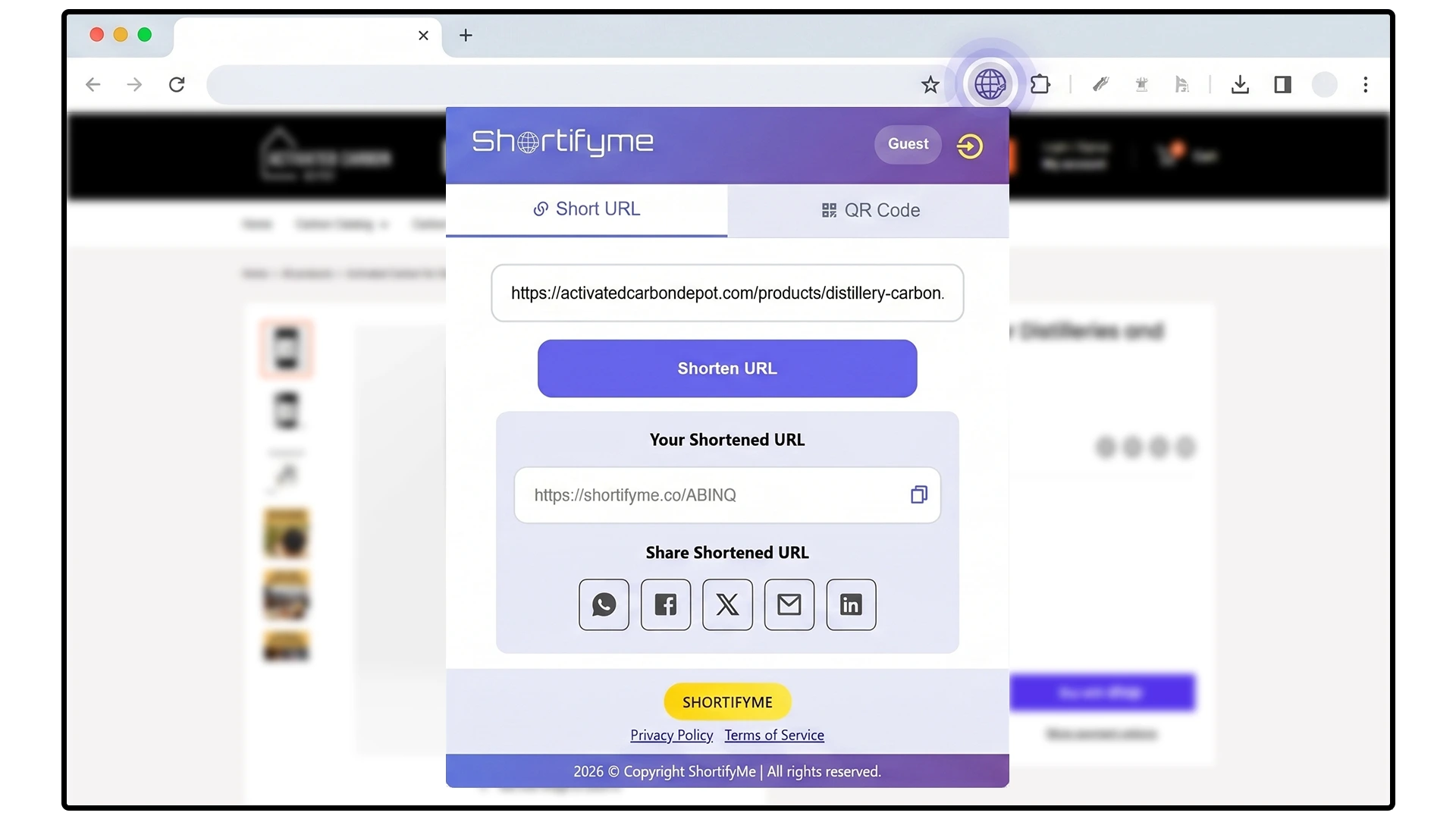
Most URL shorteners require you to switch tabs, paste your URL into a separate tool, and copy the result back. The ShortifyMe browser extension turns shortening into a one-click action from your browser toolbar. Click the icon, get your short link, paste it wherever you need it.
The extension is free on every plan, including Free. No paywall, no upgrade prompts, no ads. Available for Chrome and Edge.
Or Sign Up for Free Shortifyme Account First
Trusted by small businesses worldwide
Short links
created
Clicks
tracked
Chrome extension
installs
Ads on your links,
ever
Available for Chrome and Edge
Same one-click shortening, in either browser.
ShortifyMe for Chrome
One-click URL shortening and QR code generation, free in the Chrome Web Store. Over 1,640 installs.

ShortifyMe for Edge
One-click URL shortening and QR code generation, free in the Edge Add-ons store.
What You Can Do with the Extension
Four core actions, all available without leaving the page you’re on.

One-Click Shortening
Click the ShortifyMe icon in your browser toolbar to shorten the URL of the page you’re currently viewing. The short link can be copied directly from the extension, ready to paste into a post, email, or message.

QR Codes On Demand
Generate a QR code from the page you’re on with one click. Useful when you want to share a webpage with someone scanning from a phone, or for quick offline-to-online links during a meeting or presentation.

Save and Track Your Links
Sign in to your ShortifyMe account from the extension to save every link you create. Synced links appear in your dashboard with click counts and analytics. Without signing in, you can still shorten as a guest, with the same 5 combined-per-IP limit that applies on the website.

Use Without Signing Up
The extension works in guest mode without an account. Same 5 combined-per-IP limit as the website. To save links and enable click tracking, sign in with a free or paid account.
Sign In to Save Your Links
The extension works in guest mode without an account. Sign in with a free or paid ShortifyMe account to save links to your dashboard, track clicks & scan, and QR Code customization.
Why a Browser Extension Beats a Standalone Tool
Three reasons the extension saves more time than it seems like it should.
No Tab Switching
Without an extension: open a new tab, navigate to ShortifyMe, paste your URL, copy the short link, switch back to your original tab, paste the link. Six steps. With the extension: click the icon, paste the link. Two steps. Done thousands of times across a year of marketing work, this adds up to hours saved.
Always Available
The extension lives in your browser toolbar. It's there when you're on social media, when you're writing emails, when you're researching competitors, when you're posting to a community forum. Every page you visit is one click away from a short link.
Works on Any Page
Some shortener tools only work with copied URLs. The extension shortens whatever page you're currently on. This matters for pages with complex URLs (deep article links, parameter-heavy product pages, signed URLs) where copy-pasting feels awkward.
How to Install in Three Steps
Installation takes under a minute on either Chrome or Edge.

Click "Add to Chrome" or "Add to Edge"
From the buttons above (or further down the page), click the install button for your browser. You’ll be taken to the official Chrome Web Store or Edge Add-ons listing.

Click "Add to Chrome" / "Get" on the Store Page
On the store listing, click the install button. The extension downloads and installs automatically. A confirmation dialog will ask permission to access the URL of pages you visit; this is what lets the extension shorten the current page.

Pin to Your Toolbar
After install, click the puzzle-piece extensions icon in your browser toolbar. Find ShortifyMe in the list and click the pin icon next to it. The ShortifyMe icon now appears in your toolbar, ready to use on every page.

Sign In to Save Your Links
Click the ShortifyMe icon and sign in with your free or paid account. From now on, every link you create through the extension saves to your dashboard with click tracking enabled.
What Permissions the Extension Requests
Browser extensions ask for permissions when they install. ShortifyMe asks for the minimum needed to do what the extension does, and nothing more.
Permission to Read the Current Page URL
This is what lets the extension shorten the URL of the page you’re on. Without this permission, the extension wouldn’t know what to shorten. ShortifyMe only reads the URL when you click the extension icon, not in the background.
Storage Permission
This is what lets the extension remember your sign-in state and recently created links. The data stays in your browser; it’s not sent to ShortifyMe servers unless you explicitly create or sync a link.
Who Uses the ShortifyMe Extension Most
Three groups of users who get the most value from one-click shortening.
Social Media Managers
If you share dozens of links a day across Instagram, Facebook, X, LinkedIn, and TikTok, the time savings from one-click shortening compound fast. The extension also lets you generate a QR code from any page on the spot, useful when you need to share a campaign URL with a colleague at a conference or in a meeting.
Email Marketers and Copywriters
When drafting emails, newsletters, or sales copy, you often paste links from research tabs into your draft. The extension turns each one into a clean short link without breaking your writing flow.
Founders and Solo Operators
Solo operators wear every hat. The fewer steps each task takes, the more tasks you can do. The extension removes friction from one of the most common day-to-day actions: sharing a link. Free on every plan, so it's there when you need it without being a budget conversation.
Free Extension. Free Account. Free to Start.
Most browser extensions for URL shorteners require a paid plan to do anything useful. ShortifyMe doesn’t.
Use Without Signing In
The extension also works in guest mode without an account. Same 5 combined-per-IP limit as the website. Try the extension before committing to anything.
Sign In to Save Links
Free accounts get 10 short links and 5 QR codes monthly. Limits reset on the first of each month. Click tracking automatic on every link you create.
Upgrade for More
Paid plans add custom domains, detailed analytics, link editing, and higher monthly limits. The extension works the same on every paid plan.
Or Create a Free Account First
Frequently Asked Questions
Yes. The extension is free on every ShortifyMe plan, including Free. There's no paid extension tier and no upgrade prompt for the extension itself. Paid plans only kick in for features like custom domains, detailed analytics, and link editing, none of which are gated within the extension.
No. The extension works in guest mode without an account, with the same 5 combined-per-IP limit as the website. To save your links and access click tracking, sign in with a free or paid account. Sign-up takes 30 seconds and doesn't require a credit card.
Chrome and Edge officially. Most Chromium-based browsers (Brave, Opera, Vivaldi) can install the Chrome Web Store version since they share the same extension format. Firefox and Safari are not currently supported.
Yes, when you're signed in. Every link you create through the extension while signed in saves to your dashboard with the same click tracking as links created on the website. Free accounts see total and unique clicks. Paid accounts see the full breakdown by device, browser, OS, referrer, and location.
Two: permission to read the URL of the current page (so the extension can shorten it) and storage permission (so it can remember your sign-in state and recent links). The extension does not read page contents, modify pages, or track sites in the background.
Yes. Click the ShortifyMe icon and choose the QR code option. The QR code is generated from the URL of the page you're currently on. You can download the QR code as an image directly from the extension.
No. The extension is idle until you click the icon. It doesn't run scripts on every page you visit, doesn't track sites in the background, and doesn't keep persistent connections to ShortifyMe servers. Browser performance impact is essentially zero.
Ready to Add ShortifyMe to Your Browser?
Free Chrome and Edge extensions on every plan. One click to shorten any URL. One click to generate a QR code. No tab switching, no copy-paste loops, no ads.
Or Create a Free Shortifyme Account First