

Custom URL Back-Halves. Free on Every Plan.
Set the part after the slash to anything you want, like /spring25 or /reorder. Memorable links across every channel, no paid plan required.
Most short links end in random characters that nobody can remember. The back-half (the part after the slash) is auto-generated, looks generic, and offers nothing for your audience to recall. ShortifyMe lets you take control of that part.
Set the back-half to whatever fits the link: “summer-sale,” “reorder,” “menu,” “loyalty.” Available on every plan, including Free. No upgrade required to make your links memorable.

Would you like to check full analytics and reporting on your short link?
Would you like to check full analytics and reporting on your short link?
Would you like to check full analytics and reporting on your short link?
Would you like to check full analytics and reporting on your short link?
Try shortening a link as a guest first. Custom back-halves are available the moment you sign up for a free account.
What Is a Back-Half
A short URL has two parts. The domain comes before the slash. The back-half comes after.
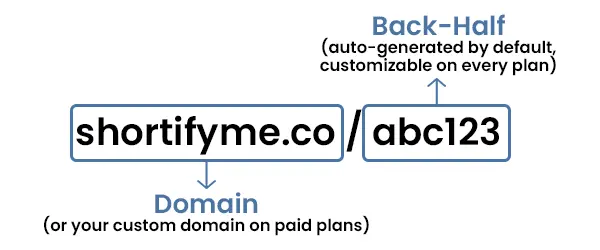
By default, ShortifyMe generates a random back-half like “abc123” or “x9z7q.” That random string works, but it’s forgettable. A custom back-half lets you replace the random characters with something memorable.
shortifyme.co/x9z7q ➔ shortifyme.co/spring25
shortifyme.co/abc123 ➔ shortifyme.co/menu
shortifyme.co/qm4f2 ➔ shortifyme.co/reorder
The version on the right in each example is what you read aloud at a meeting, what you write down on a napkin, what your customer types into their browser when they remember it from your business card three days later. The version on the left is what gets forgotten.
Why a Memorable Back-Half Earns More Clicks
Three reasons custom back-halves consistently outperform random ones.
Easier to Read Aloud
If you say "shortifyme.co/x9z7q" out loud, no one can write it down accurately. If you say "shortifyme.co/menu," everyone gets it. For podcast mentions, video shoutouts, presentations, and live events, custom back-halves are the difference between an audience that follows up and an audience that gives up.
Builds Trust at a Glance
Random short URLs look automated and impersonal, like spam links. Custom back-halves look intentional, like the result of someone who cared about the link. On social media especially, where audiences are skeptical of unfamiliar URLs, that intentionality earns clicks that random links lose.
Free Across Every Channel
Custom back-halves work everywhere ShortifyMe links work: social posts, emails, printed materials, QR codes. The same memorable back-half you use on your Instagram bio shows up the same way on your business card. Consistent across channels, with no extra cost on Free.
How to Create a Custom Back-Half
From signup to a custom back-half link in under two minutes.

Create a Free Account
Sign up for free. No credit card required. Custom back-halves are unlocked the moment you create an account.

Paste Your Destination URL
Open the ShortifyMe shortener and paste the long URL you want to shorten.

Type Your Custom Back-Half
Type your custom back-half into the alias field. Use letters, numbers, and hyphens. Examples: “spring25,” “new-product,” “reorder.” If the back-half is already taken on the default ShortifyMe domain, you’ll see a notification and can pick a different one.

Create the Link
Click create. Your new short link reads shortifyme.co/your-back-half. Copy it and share. The link tracks clicks automatically the moment it’s created.
On Free, the back-half you set at creation is permanent for that link. On any paid plan, you can rename the back-half anytime, useful if you make a typo or want to repurpose a link for a new campaign.
Tips for Choosing a Good Back-Half
Five practical guidelines for back-halves that age well and earn clicks.
Keep It Short
The whole point of a short link is to be short. A back-half longer than 10-12 characters defeats the purpose. “shortifyme.co/sale” beats “shortifyme.co/our-amazing-summer-sale-event-2026.”
Use Hyphens, Not Underscores
Hyphens are easier to read at a glance and harder to mistake for spaces. “shortifyme.co/black-friday” reads cleanly. “shortifyme.co/black_friday” looks like a single hard-to-parse word, especially in printed materials.
Avoid Numbers When Possible
Numbers in URLs feel transactional and forgettable. “shortifyme.co/menu” is more memorable than “shortifyme.co/menu1” or “shortifyme.co/menu-2026.” Save numbers for time-bound campaigns where the year matters (“holiday2025”).
Match the Destination's Purpose
The back-half should signal what the destination is. “shortifyme.co/menu” tells visitors they’re going to a menu. “shortifyme.co/x9z7q” tells them nothing. Names that describe purpose earn more clicks than names that describe nothing.
Plan Ahead on Free
Free users can’t edit a back-half after creation. Before clicking create, double-check your spelling and make sure the back-half makes sense for the intended use. If you accidentally type “summr-sale” instead of “summer-sale,” you can’t fix it on Free; you’d need to create a new link or upgrade to paid for renaming capability.
How Small Businesses Use Custom Back-Halves
Three real ways custom back-halves earn their place in everyday small business marketing.
Podcasts and Live Mentions
If you ever say a URL out loud (on a podcast, in a video, at a presentation, on a phone call), the back-half is the difference between an audience that remembers and an audience that forgets. "Visit shortifyme.co/menu" gets remembered. "Visit shortifyme.co/x9z7q" gets ignored.
Recurring Campaigns
If you run the same type of campaign every season (newsletter signup, holiday sale, monthly promotion), use predictable back-halves so your audience learns where to look. "shortifyme.co/newsletter" stays consistent across email signatures, social bios, and printed materials. Customers know what to expect and trust links you publish.
Print and Business Cards
On printed materials where typing the URL into a browser is a real action customers might take, memorable back-halves convert. "shortifyme.co/reorder" on packaging works because customers can actually remember it long enough to type it. "shortifyme.co/x9z7q" on packaging gets thrown out with the box.
Custom Back-Halves Free on Every Plan
Most URL shortener platforms gate custom URL aliases behind a paid tier. ShortifyMe doesn’t.
10 Custom Links Monthly
Free accounts get 10 short links and 5 QR codes a month. Every one can have a custom back-half. Limits reset on the first of each month.
No Credit Card
Free is free forever. No trial countdown. No credit card required. Sign up takes 30 seconds.
No Ads. Ever.
Your audience goes straight to your destination. ShortifyMe never inserts ad redirects between the click and the content.
Need to rename back-halves after creating links? Need a custom domain to combine with custom back-halves? Paid plans starting at $7.99/month add both.
Frequently Asked Questions
The back-half is the part of a short URL that comes after the slash. In "shortifyme.co/spring25," the back-half is "spring25." By default, ShortifyMe generates random back-halves like "abc123." A custom back-half lets you replace the random string with something memorable.
Yes. Custom back-halves are available on every plan, including Free. You can set a custom back-half when creating any link. The only paid-tier behavior is the ability to rename back-halves after creation; Free users can set them but cannot edit them later.
On any paid plan, yes. Paid users can rename URL aliases anytime, useful for fixing typos or repurposing links. Free users cannot edit back-halves after creation, so plan carefully when on Free. If you make a mistake on Free, the easiest fix is to create a new link with the correct back-half.
Letters (a-z, A-Z), numbers (0-9), and hyphens. Spaces, underscores, and special characters are typically not allowed. Hyphens are recommended over underscores for readability.
Back-halves are unique per domain. If your preferred back-half is already in use on the default shortifyme.co domain, you'll see a notification and can pick a different one. With a paid plan and your own custom domain, the namespace is yours alone, so back-halves like "sale" or "menu" are available.
Yes. Custom back-halves use the same redirect, the same click tracking, and the same analytics as random ones. The only difference is what visitors see in the URL. Click counts, location data, device data, and all other tracking work identically.
Yes. Branded short links work everywhere generic short links work, with one common advantage: branded links often render their preview better and earn more clicks because audiences trust the visible domain.
A custom back-half changes the part after the slash (“shortifyme.co/your-back-half”). A custom domain changes the part before the slash (“yourbrand.com/anything”). Combining both creates fully branded short links like “yourbrand.com/your-back-half.” Custom back-halves are free; custom domains require a paid plan.
No. Each back-half can point to one destination at a time. If you delete a link, you can create a new one with the same back-half (paid users can also reassign by editing). For ongoing campaigns where the destination changes, paid users can edit the destination without changing the back-half, this is called dynamic short link behavior.
Start Creating Memorable Short Links Today
Every link you create can have a custom back-half. Free on every plan including Free. Set the back-half to anything you want. No ads, no setup, no credit card required.